· 11 min read
How to Track Keyword Rankings: Methods, Tools, and What to Watch
You’ve done your keyword research, optimized your pages, and published new content. Now comes the real question: is it working? To track keyword rankings means monitoring where your pages appear in search results for target queries—and how those positions evolve over time.
This guide explains how to track rankings using free and paid methods, what metrics matter beyond raw position, how to build a practical report, and how to turn ranking movements into traffic and conversions.
Why track keyword rankings?
- Measure SEO progress. Position trends show whether your content updates, technical fixes, or links gain traction.
- Spot issues early. A sudden drop can flag an indexing problem, a broken redirect, a lost link, or a stronger competitor.
- Capture quick wins. Queries sitting between positions 8 and 20—at the bottom of page one or on page two—often offer the fastest path to more clicks.
- Prioritize content efforts. Ranking patterns reveal which topics deserve deeper coverage or internal links.
- Communicate results clearly. Stakeholders, clients, and teammates respond well to concrete before-and-after snapshots.
Keep the end goal in mind: rankings are a means to an end, not the finish line. Qualified visits, leads, and sales are what drive real growth.
Four ways to track keyword rankings
| Method | Best for | Limits |
|---|---|---|
| Google Search Console | Free, real performance data for queries you already get impressions for | Reports average positions rather than a fixed daily snapshot, and only covers queries with impressions |
| Rank tracking tools | Tracking selected keywords, competitors, locations, and devices over time | Mostly paid, and results reflect snapshots taken under fixed settings |
| Manual checks | Quick spot-checks on a few priority terms | Location, search history, device, and SERP layout can skew what you see |
| Analytics & spreadsheets | Connecting ranking shifts with organic traffic, CTR, and conversions | Requires manual updates and ongoing maintenance |
Google Search Console
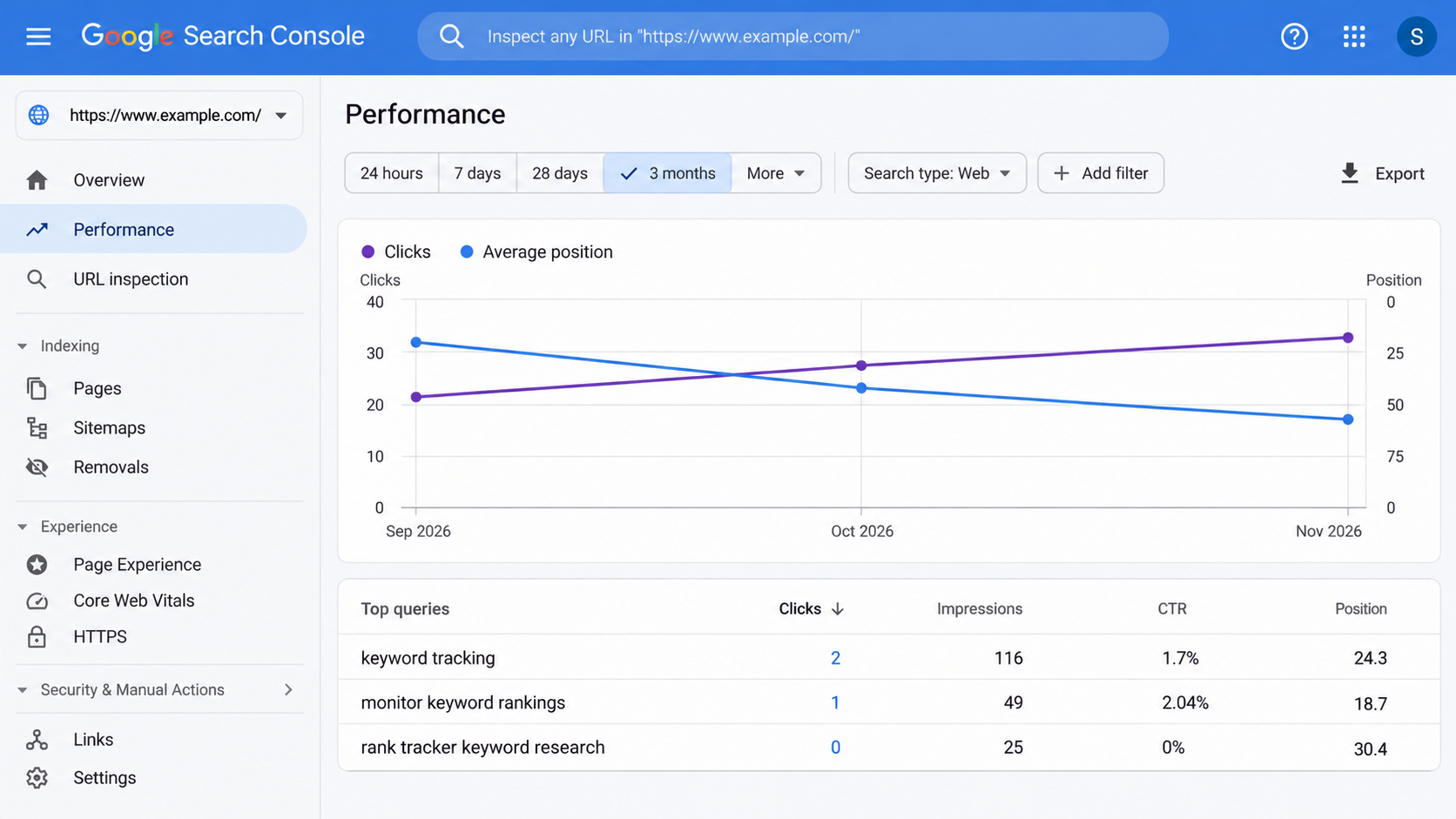
The Performance report shows the queries and pages generating impressions, clicks, click-through rate (CTR), and average position. Because it reflects real search appearances in Google, it is your best baseline for spotting queries already close to page one.
Remember that “average position” averages results across devices, locations, and SERP features. A page with a middling average can still rank high for specific users or regions.
Rank tracking tools
Dedicated rank trackers monitor your chosen keyword list on a regular schedule and log historical movement, often with location targeting, mobile/desktop splits, and competitor tracking. If you need help selecting software, see our guide on how to choose an SEO tool.
Manual checks
Searching in an incognito or private window works for quick sanity checks, but treat what you see as a rough spot-check rather than a reliable metric.
How to set up keyword tracking step by step
- Pick a focused keyword set. Start with 20 to 50 keywords covering core commercial terms, main content pillars, and high-intent long-tail queries you can actually act on.
- Group keywords by topic or page. Clustering terms helps you spot page-level trends instead of getting lost in row-by-row noise.
- Capture a baseline first. Record current positions, impressions, and clicks before making major edits.
- Match location and device to your audience. Configure countries, cities, and mobile vs. desktop views where your customers search.
- Set a sensible cadence. Weekly tracking fits most websites; checking daily often highlights short-term volatility rather than real progress.
- Monitor two or three key competitors. Watching rival movement helps explain sudden shifts on shared keywords.
- Tie rankings to business outcomes. Pair position data with organic clicks, engagement, and conversions.
If you are still building your target list, start with our keyword research guide.
Monitor keyword rankings: how to keep a regular watch
Once tracking is in place, the real value comes from how you monitor keyword rankings week after week without overreacting to every small dip.
- Weekly review. Check movement by keyword group or landing page once a week so you spot patterns rather than single-day swings.
- Monthly trend check. Compare month-over-month progress, flag pages gaining momentum, and list pages losing ground.
- Quarterly list cleanup. Prune keywords that no longer fit your goals and add new terms tied to updated products or services.
- Set drop alerts. Enable alerts for sharp position losses so you can investigate technical or content issues early.
Even a lightweight spreadsheet updated weekly from Google Search Console works well when getting started. Consistency matters far more than complexity.
How to build a keyword ranking report
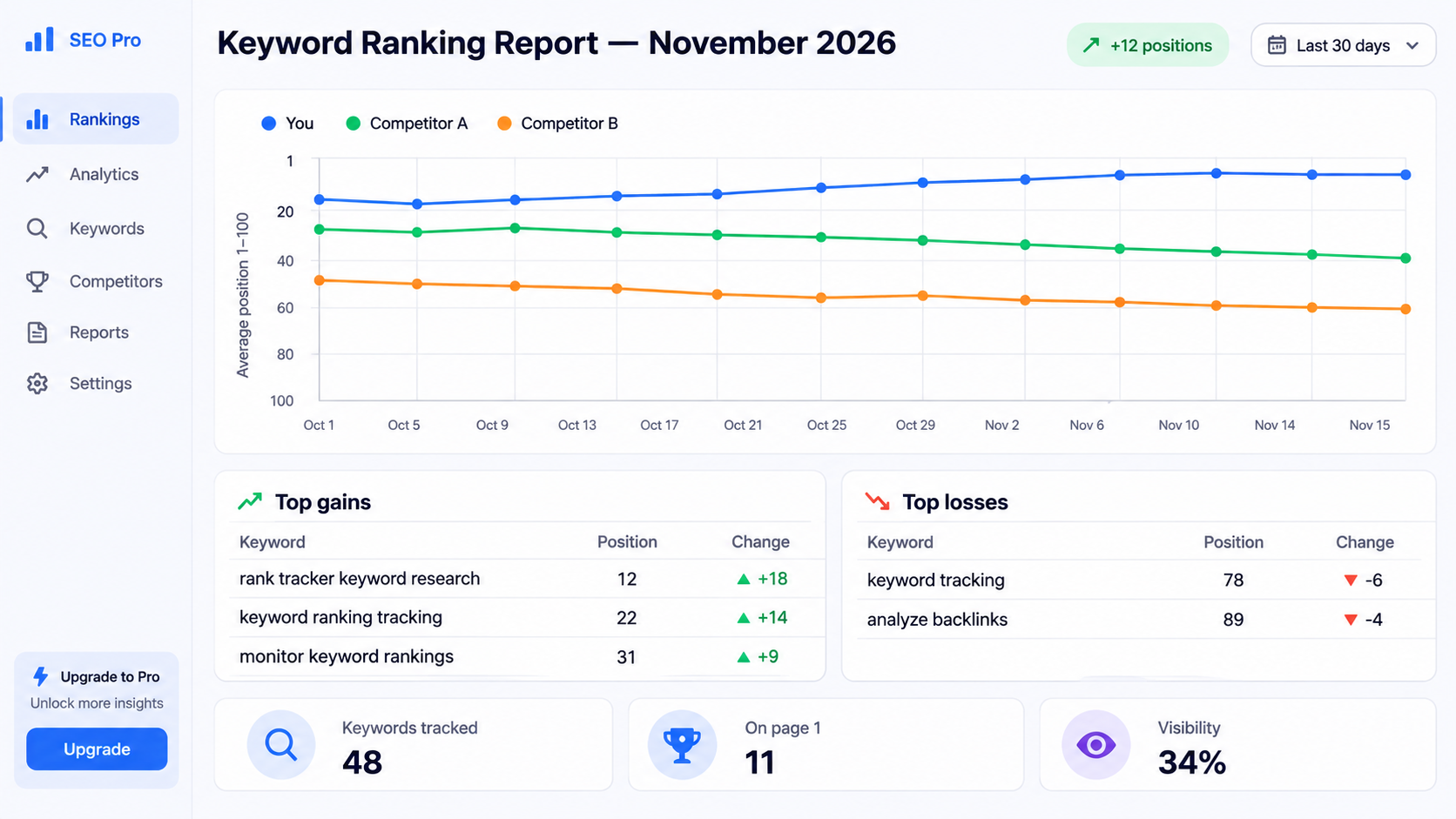
A clear keyword ranking report turns raw position tables into practical next steps for your team, stakeholders, or clients.
- Movement overview. Summarize how many tracked keywords improved, dropped, or held steady since the last report.
- Biggest winners and losers. Highlight the top three to five ranking shifts alongside the exact URLs involved.
- Page-one visibility. Track how many target terms sit in the top 10—and how many are within striking distance on page two.
- Traffic & visibility trend. Show overall search visibility alongside clicks and conversions so context stays clear.
- Completed and next actions. Document what you changed and what pages you plan to optimize next.
Aim for a concise one-page summary with a clear trend visual and a short action list rather than a massive data dump.
Online keyword tracking: tools compared
If you rely on online keyword tracking beyond Search Console, compare the main tools based on your budget, tracking frequency, and workflow.
| Tool | Best for | Free tier / trial | Key strengths | Main limits |
|---|---|---|---|---|
| Google Search Console | Actual query impressions, clicks, and CTR in Google | Free | First-party Google data at zero cost | Average positions, no exact daily rank tracker |
| Semrush | Agencies, competitive tracking, and keyword research | Limited trial | Broad keyword index and strong competitor visibility data | Paid plans can get expensive as projects scale |
| Ahrefs | Combining rank tracking with backlink and content analysis | Limited trial | Strong link data, intuitive interface, solid SERP history | Paid subscription required for full tracking |
| Moz Pro | Smaller teams and straightforward local tracking | 30-day trial | Accessible reporting and clean local rank tracking | Smaller keyword database than larger suites |
| Wincher | Focused, regular rank tracking without bloat | Limited free plan | Easy setup, clear daily/weekly updates, cost-effective | Fewer all-in-one SEO suite features |
| SERPWatcher (Mangools) | Lean budgets and simple rank monitoring | Limited free plan | Clean UI and practical tracking for core terms | Less depth than enterprise SEO platforms |
How to choose: start free with Search Console, add a rank tracker when you need consistent monitoring across locations, devices, or competitors, and use our AI SEO Score Checker or Website Performance Analysis to diagnose on-page and speed bottlenecks holding rankings back.
What to track besides position
- Impressions and clicks. Rising impressions often precede ranking and click gains when a page starts gaining relevance.
- Click-through rate (CTR). A solid position with low CTR usually signals a title tag or meta description that needs stronger appeal.
- Ranking URL. Verify that Google ranks your intended page rather than an older or less relevant URL on your site.
- SERP features. Featured snippets, local packs, video carousels, and AI/rich results change how many clicks organic links get. Learn more in our SERP guide.
- Top-10 keyword share. Tracking how many terms reach page one gives a clearer view of overall momentum.
- Organic conversions. Leads, sign-ups, and sales show whether your rankings attract the right visitors.
Why your rankings fluctuate
Some movement is normal in search results. Common drivers include:
- Routine SERP fluctuation. Minor day-to-day position shifts happen regularly.
- Location and personalization. Searchers in different places or contexts can see different orderings.
- Competitor updates. Rivals publishing fresher content or earning stronger links can push pages up or down.
- Search engine algorithm updates. Ranking systems and SERP layouts evolve continuously.
- Site changes. Redesigns, URL migrations, template edits, and plugin updates can temporarily shake rankings.
- Technical issues. Crawl blocks, indexing errors, or slow load times can hold pages back. Run a Technical SEO Audit to spot technical blockers early.
Evaluate performance over multi-week windows rather than reacting to a single day’s movement.
What to do when rankings drop
- Verify the drop. Cross-check Search Console and your rank tracker before assuming a major loss.
- Isolate the scope. Determine whether the drop affects one keyword, one URL, one device, or multiple pages.
- Audit technical health. Check indexation, status codes, canonicals, speed, and mobile usability. See our technical SEO audit guide and test mobile readiness with our Mobile SEO Checker.
- Check recent changes. Review recent content edits, internal link changes, or external link shifts.
- Inspect the current SERP. Look at what now ranks on page one—format, depth, freshness, and search intent may have shifted.
- Fix and monitor. Update thin or outdated sections, improve internal links, and give Google time to recrawl and re-evaluate.
Tracking rankings for local businesses
For local businesses, proximity and map-pack visibility often outweigh standard organic listings alone. Track rankings from the specific cities or neighborhoods you serve alongside your Google Business Profile performance.
Common mistakes when tracking rankings
- Tracking too many keywords. Oversized lists create clutter without clear priorities.
- Chasing daily fluctuations. Short-term noise leads to unnecessary edits.
- Ignoring location and device differences. Desktop and mobile results—or results across cities—can diverge sharply.
- Measuring success by rank alone. Ranking #5 for a term with zero buyer fit or weak CTR won’t grow your business.
- Relying on a single source without context. Always pair tracker snapshots with Search Console and analytics data.
- Mixing branded and non-branded queries. Brand searches behave very differently from discovery keywords.
- Collecting data without acting on it. Tracking only pays off when insights lead to page improvements.
Turn ranking data into action
- Positions 8 to 20: Expand coverage where needed, sharpen search intent alignment, improve the title tag, and add internal links from relevant pages.
- Good rankings, low CTR: Rewrite title tags and meta descriptions to clarify value and match what searchers want.
- Good traffic, low conversions: Improve page clarity, trust signals, and calls to action—check with our Website Trust Score Checker and AI Conversion Audit.
- Missing rankings: Create a dedicated page or overhaul an existing one to match the query’s intent.
For practical next steps on raising positions, read our guide on how to improve website ranking, and learn how to evaluate overall traffic in our guide to checking website traffic.
Find what holds your pages back
Analyzaa doesn’t track keyword positions—use Google Search Console or a dedicated rank tracker for that. Instead, Analyzaa audits your pages to uncover SEO gaps, slow loading, weak trust signals, UX friction, and conversion leaks so you know what to fix alongside your ranking data.
Run a check with our AI SEO Score Checker, Website Performance Analysis, AI Website Analyzer, or Core Web Vitals Checker.
FAQ
How can I track keyword rankings for free?
Use Google Search Console’s Performance report to check average positions, impressions, and clicks for queries your site already surfaces for, supplemented by occasional private-window spot checks.
How often should I check my keyword rankings?
Weekly checks work well for most sites, paired with a monthly review of trends. Avoid making changes based on minor daily swings.
Why does my ranking look different from what a tool shows?
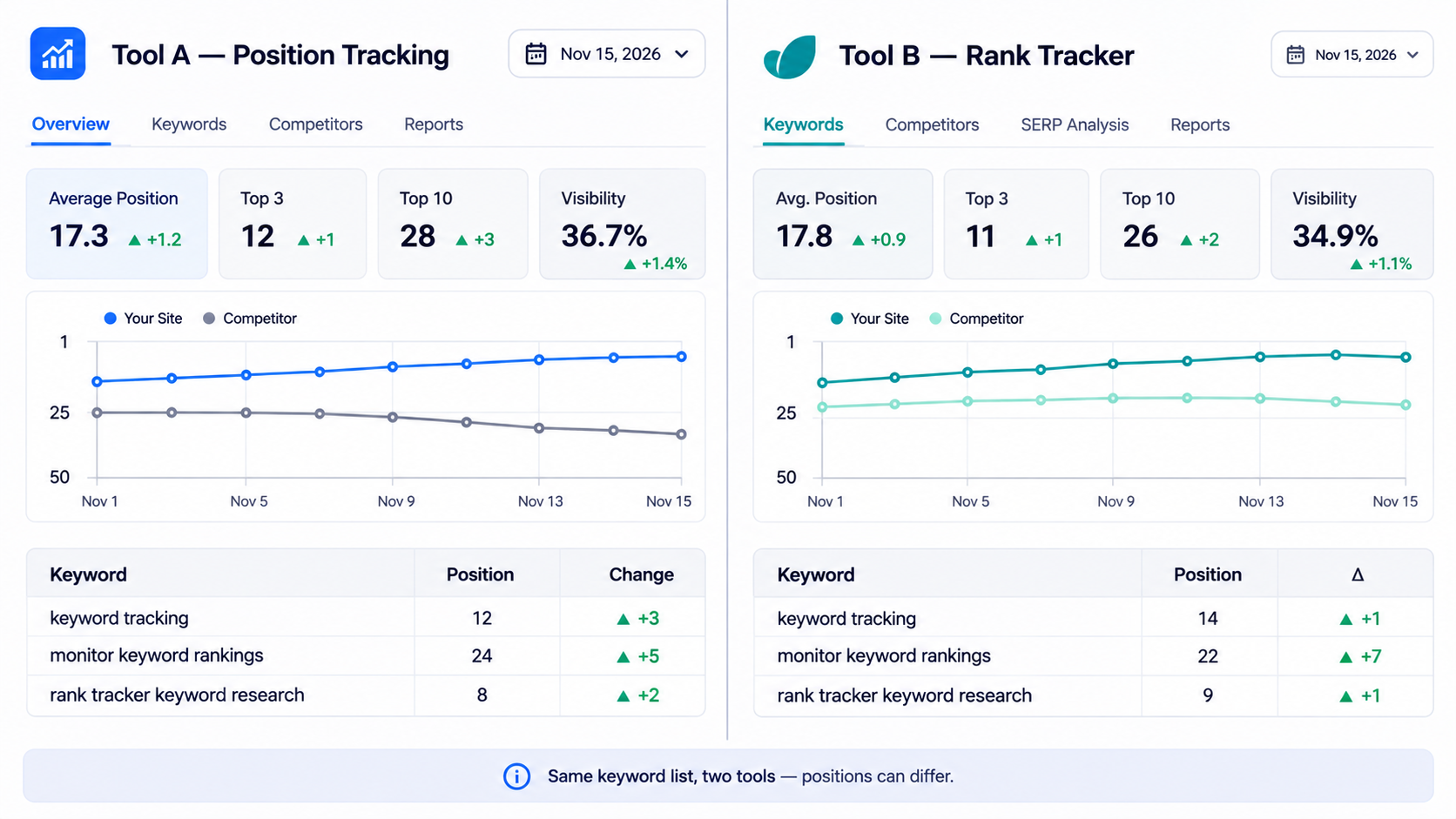
Search results shift with location, device, personalization, SERP features, and timing. Tools measure under fixed settings, making them best for tracking trends over time rather than treating any single number as absolute.
How many keywords should I track?
Start with 20 to 50 priority keywords tied to key pages and revenue or lead goals, expanding only when you have the bandwidth to act on the findings.
Are rankings the most important SEO metric?
No. Rankings help you diagnose visibility, but clicks, qualified organic traffic, leads, and conversions measure real business impact.
How do I monitor keyword rankings without a paid tool?
Combine Google Search Console’s Performance report with a simple weekly spreadsheet tracking target queries, landing pages, average position, impressions, and clicks.
What should a keyword ranking report include?
A strong ranking report covers net movement vs. the prior period, top gains and losses with URLs, page-one share, visibility and click trends, and concrete next steps—ideally summarized on one readable page.
Is online keyword tracking accurate?
Every method has trade-offs: Search Console reflects real Google search appearances, while rank trackers show consistent snapshots under fixed parameters. Using both gives you a much clearer picture.
Can I track keyword rankings for free online?
Yes. Google Search Console is free for monitoring your site’s actual queries and positions, and several rank trackers offer limited free tiers for small lists.
track keyword rankings, monitor keyword rankings, keyword ranking report
Want to test your website right now?
Run a free instant audit across SEO, speed, UX, and conversions with Analyzaa.